
saydo links what people say to what they do. It applies a qualitative codebook to text with a large language model, checks the coding against a human coder, and then tests whether each theme goes with a difference in a quantitative metric.
This article walks through the whole workflow on simulated data.
Every step runs offline with mock_coder(), a keyword-based
stand-in for the LLM, so no API key is needed. The step that calls a
real model is shown but not run.
The data
mock_mixed_data() simulates users from three hidden
profiles. Frustrated users have long sessions and many errors, efficient
users have short clean sessions, and casual users sit in between. Each
user leaves a line of feedback whose wording depends on their profile.
Feature requests are added at random, so they should show no real
effect.
users <- mock_mixed_data(n_users = 150, seed = 2026)
users
#> # A tibble: 150 × 5
#>    user_id  profile    session_duration_sec errors_encountered
#>    <chr>    <chr>                     <dbl>              <int>
#>  1 USR-1001 frustrated                  455                  8
#>  2 USR-1002 frustrated                  481                  6
#>  3 USR-1003 frustrated                  437                 11
#>  4 USR-1004 efficient                   119                  0
#>  5 USR-1005 frustrated                  389                  3
#>  6 USR-1006 casual                      311                  5
#>  7 USR-1007 casual                      252                  2
#>  8 USR-1008 frustrated                  521                  6
#>  9 USR-1009 casual                      234                  0
#> 10 USR-1010 efficient                   172                  0
#>    transcript_feedback
#>    <chr>
#>  1 I got completely lost trying to save my profile. The button vanished.
#>  2 I got completely lost trying to save my profile. The button vanished.
#>  3 The layout changed and now I can't find where my dashboard went. It would be…
#>  4 Extremely efficient workflow. Saved me a ton of time today. Please add an op…
#>  5 This interface is incredibly frustrating. It took me three tries to upload.
#>  6 The application loaded normally and I viewed my recent activity history. It …
#>  7 Standard performance. Nothing spectacular but it gets the job done.
#>  8 This interface is incredibly frustrating. It took me three tries to upload. …
#>  9 The application loaded normally and I viewed my recent activity history.
#> 10 The feature works exactly as expected. Seamless export process.
#> # ℹ 140 more rows
The profile column is the ground truth. Real data would
not have it; here it lets us check that the workflow recovers what was
built in.
Step 1: write a codebook
A codebook maps each code name to a definition. The definitions are what the LLM sees, so make them specific: what counts, and what does not. Code names become column names, so they must be syntactic R names.
codebook <- c(
  UI_Confusion        = "The user reports being lost, confused, or unable to find something in the interface",
  Positive_Experience = "The user expresses satisfaction, praise, or enjoyment of the product",
  Feature_Request     = "The user asks for a feature or capability that does not currently exist"
)
Step 2: code the text
With a real LLM, pass any ellmer chat object. Pin the exact model so the coding can be reproduced:
coded <- llm_auto_code(
  users, user_id, transcript_feedback, codebook,
  chat = ellmer::chat_openai(model = "gpt-4.1-mini")
)
Each text is coded in its own conversation, so earlier texts cannot
influence later ones. The first text is sent on its own: if the API key,
account credit or model name is wrong, you get an error within seconds
rather than a stalled batch. The remaining texts are sent in parallel
(max_active at a time). Empty or missing texts are not sent
and get NA.
Here we use the offline coder instead:
coded <- llm_auto_code(users, user_id, transcript_feedback, codebook,
                       coder = mock_coder())
coded[, c("user_id", names(codebook))]
#> # A tibble: 150 × 4
#>    user_id  UI_Confusion Positive_Experience Feature_Request
#>    <chr>    <lgl>        <lgl>               <lgl>
#>  1 USR-1001 TRUE         FALSE               FALSE
#>  2 USR-1002 TRUE         FALSE               FALSE
#>  3 USR-1003 TRUE         FALSE               TRUE
#>  4 USR-1004 FALSE        TRUE                TRUE
#>  5 USR-1005 TRUE         FALSE               FALSE
#>  6 USR-1006 FALSE        FALSE               TRUE
#>  7 USR-1007 FALSE        FALSE               FALSE
#>  8 USR-1008 TRUE         FALSE               TRUE
#>  9 USR-1009 FALSE        FALSE               FALSE
#> 10 USR-1010 FALSE        TRUE                FALSE
#> # ℹ 140 more rows
Step 3: check the coding against a human
Before trusting automated codes, have a person code a random sample blind and compare. To illustrate, we simulate a human coder who follows the hidden profiles but makes occasional mistakes:
set.seed(1)
sample_rows <- sample(nrow(users), 50)
flip <- function(x, rate = 0.08) xor(x, runif(length(x)) < rate)

human <- data.frame(
  user_id = users$user_id[sample_rows],
  UI_Confusion = flip(users$profile[sample_rows] == "frustrated"),
  Positive_Experience = flip(users$profile[sample_rows] == "efficient"),
  Feature_Request = flip(grepl("wish|please add|would be great",
                               users$transcript_feedback[sample_rows]))
)

code_agreement(coded, human)
#> # A tibble: 3 × 11
#>   theme                   n prevalence_llm prevalence_human agreement kappa
#>   <chr>               <int>          <dbl>            <dbl>     <dbl> <dbl>
#> 1 UI_Confusion           50           0.46             0.5       0.96 0.92
#> 2 Positive_Experience    50           0.28             0.36      0.92 0.818
#> 3 Feature_Request        50           0.34             0.24      0.9  0.760
#>   kappa_low kappa_high precision recall    f1
#>       <dbl>      <dbl>     <dbl>  <dbl> <dbl>
#> 1     0.811      1         1      0.92  0.958
#> 2     0.646      0.989     1      0.778 0.875
#> 3     0.561      0.960     0.706  1     0.828
How to read it:
- kappa corrects raw agreement for chance. As a rough guide, above 0.6 is substantial and above 0.8 near-perfect.
- precision is the share of the LLM’s “present” codes that the human agrees with. Low precision means the LLM over-applies the code.
- recall is the share of the human’s “present” codes that the LLM also found. Low recall means the LLM misses the theme.
If a code scores poorly, sharpen its definition and re-code. Report these figures alongside your analysis.
Step 4: link themes to the metrics
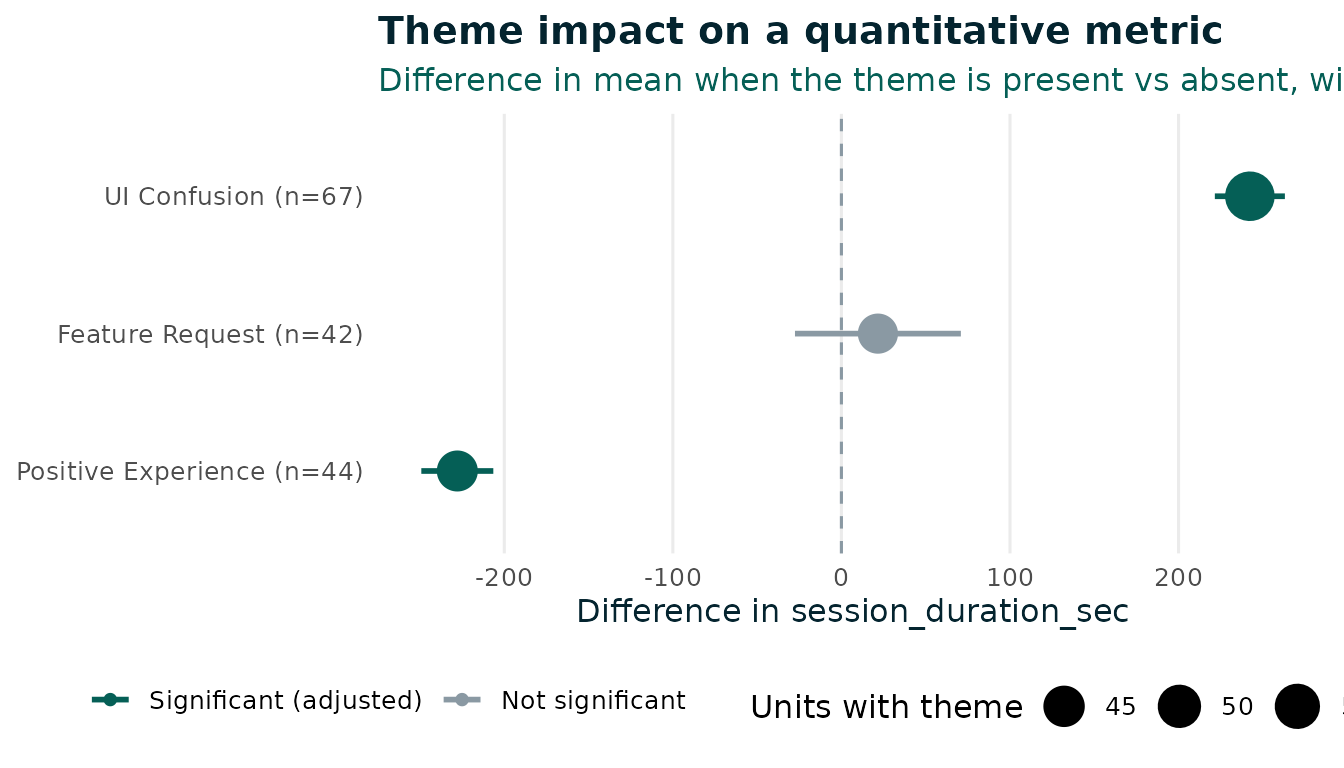
cross_tab_themes() compares the metric between units
with and without each theme, using Welch’s t-test, and adjusts the
p-values for the number of themes tested (Benjamini–Hochberg by
default).
results <- cross_tab_themes(coded, session_duration_sec)
results
#> # A tibble: 3 × 12
#>   theme               n_absent n_present mean_absent mean_present difference
#>   <chr>                  <int>     <int>       <dbl>        <dbl>      <dbl>
#> 1 UI_Confusion              83        67        199.         441.      242.
#> 2 Positive_Experience      106        44        374.         146.     -228.
#> 3 Feature_Request          108        42        301.         323.       21.7
#>   conf_low conf_high cohens_d  p_value p_adjusted significant
#>      <dbl>     <dbl>    <dbl>    <dbl>      <dbl> <lgl>
#> 1    222.      263.     3.77  4.74e-50   1.42e-49 TRUE
#> 2   -249.     -207.    -2.56  1.21e-43   1.82e-43 TRUE
#> 3    -27.6      70.9    0.158 3.84e- 1   3.84e- 1 FALSE
The codebook and ID column are remembered from
llm_auto_code(), so you only name the metric. Run it again
for other metrics:
cross_tab_themes(coded, errors_encountered)[, c("theme", "difference", "p_adjusted", "significant")]
#> # A tibble: 3 × 4
#>   theme               difference p_adjusted significant
#>   <chr>                    <dbl>      <dbl> <lgl>
#> 1 UI_Confusion             6.24    5.14e-33 TRUE
#> 2 Positive_Experience     -5.53    1.58e-32 TRUE
#> 3 Feature_Request          0.209   7.51e- 1 FALSE
These are associations, not causal effects. Confused users have
longer sessions, but the comparison does not adjust for anything else.
For that, fit your own model on coded.
Segment-level transcripts
Interviews are often coded by segment, with many rows per
participant, while the metrics have one row per participant. Code the
segments as they are, then pass the participant table as
metrics. A theme counts as present for a participant if it
appears in any of their segments:
segments <- data.frame(
  participant = c("P1", "P1", "P2", "P2", "P3", "P4", "P4", "P5", "P6"),
  segment_id  = 1:9,
  text = c("It was fine at first.", "Then I got completely lost.",
           "Everything was clean and fast.", "I love the export.",
           "So confusing, I could not find the settings.",
           "Normal day.", "Nothing to report.",
           "I got lost twice.", "It works."),
  stringsAsFactors = FALSE
)
logs <- data.frame(participant = paste0("P", 1:6),
                   minutes_active = c(42, 12, 39, 15, 45, 14))

coded_segments <- llm_auto_code(segments, participant, text,
                                c("UI_Confusion", "Positive_Experience"),
                                coder = mock_coder())

cross_tab_themes(coded_segments, minutes_active, metrics = logs)
#> # A tibble: 2 × 12
#>   theme               n_absent n_present mean_absent mean_present difference
#>   <chr>                  <int>     <int>       <dbl>        <dbl>      <dbl>
#> 1 UI_Confusion               3         3        13.7           42       28.3
#> 2 Positive_Experience        5         1        31             12       NA
#>   conf_low conf_high cohens_d   p_value p_adjusted significant
#>      <dbl>     <dbl>    <dbl>     <dbl>      <dbl> <lgl>
#> 1     22.1      34.6     11.9  0.000736   0.000736 TRUE
#> 2     NA        NA       NA   NA         NA        FALSE
To check agreement at segment level, give each segment its own ID and
pass it as id_col,
e.g. code_agreement(coded_segments, human, id_col = "segment_id").
Data protection
With a hosted LLM, every text is sent to the provider. Check that
this is allowed under your ethics approval and data agreements before
coding real participant data, or run a local model with
ellmer::chat_ollama().